Try every tool once free · Just your email

Checks for Buying Land and Building Back Home

Five tools for the questions diaspora buyers ask most: where a survey plan really lands, what an estate will charge on top of the advertised price, whether a site photo is new, and whether a builder's quote and concrete mix add up. Each one tells you what it cannot check.

Run each tool once free on your own numbers with just your email; the samples are always free, no email needed. Unlimited calculator checks come with Farm & Boundary Watch; Build & Milestone Watch adds site-photo checks and document scanning.

Buying land: 1. Survey plan location · 2. Estate fees Building: 3. Site photos · 4. Builder quotes · 5. Concrete mix
Each tool: 1 free check on your own numbers per device. Samples are always free.
Farm & Boundary Watch ($19/mo) unlocks the four calculators, includes Plot Watch for one plot, and adds a monthly farm note. The note says whether the plot looks bare, thinly covered, or green, and it does not name a crop or who did the work. Build & Milestone Watch ($29/mo) adds a monthly build note, the site-photo check, and document scanning. Plot Watch on its own includes unlimited Survey Plan Location Checks. Compare plans and prices
Already subscribed? Restore access on this device
SAMPLE REPORTS · REAL FLOOD ZONES

Three real plots the free screen flags as higher flood risk

One each in Nigeria, Ghana and Kenya. Each report is the same free plot screen anyone can run, made from public satellite and elevation data.

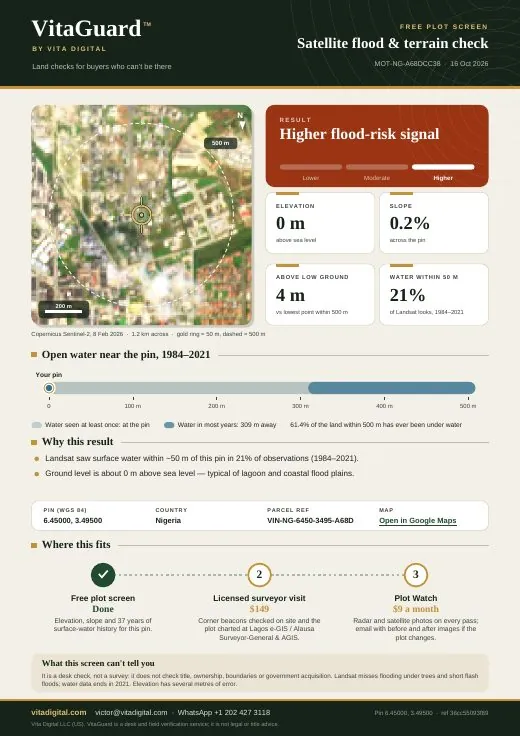
First page of a free plot screen for a Lekki, Lagos pin: higher flood risk, ground about 0 m above sea level, satellite photo of estates on reclaimed lagoon land

Lekki, Lagos · Nigeria

Reclaimed lagoon land where new estates are still being sold.
  • Ground about 0 m above sea level
  • Water seen at the pin in about 1 in 5 satellite looks
  • 61% of the land within 500 m has been under water
Open the PDF
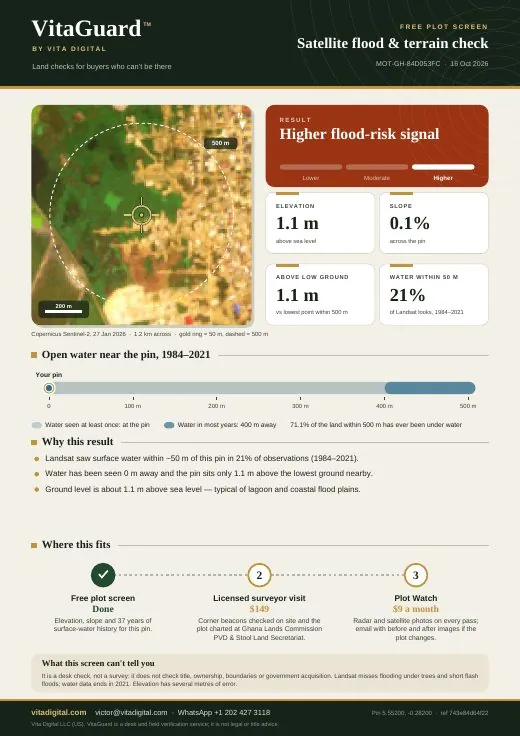
First page of a free plot screen for a Mendskrom, Gbawe pin in Accra: higher flood risk, ground about 1 m above sea level, satellite photo of houses beside the Densu wetlands

Mendskrom, Gbawe · Accra, Ghana

Houses beside the Densu wetlands. The June 2026 Accra floods displaced about 2,500 people in Weija-Gbawe.
  • Ground about 1 m above sea level
  • Water seen at the pin in about 1 in 5 satellite looks
  • 71% of the land within 500 m has been under water
Open the PDF
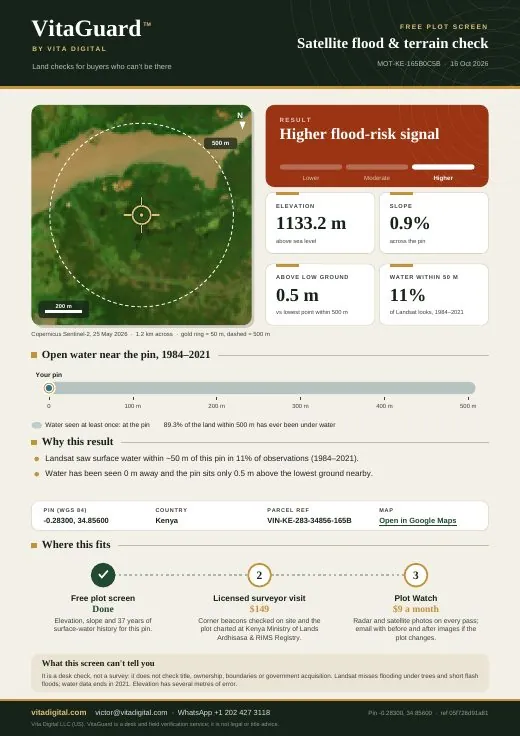
First page of a free plot screen for a farm pin at the Nyando river mouth in Kisumu County: higher flood risk, half a metre above the lowest ground nearby, satellite photo of the river and farmland

Nyando river mouth · Kisumu, Kenya

Low farmland where the Nyando river meets Lake Victoria.

  • Only 0.5 m above the lowest ground nearby
  • Water seen at the pin in about 1 in 9 satellite looks
  • 89% of the land within 500 m has been under water
Open the PDF

Check your own plot free

TOOL #1 · SEE WHERE A SURVEY PLAN REALLY LANDS

1. Survey Plan Location Check Included with: Farm & Boundary Watch, Build & Milestone Watch or Plot Watch

Survey plans list each corner of the plot as grid numbers (Eastings and Northings) that Google Maps cannot read. Copy them from your plan and this tool converts them to GPS, shows where the plot actually is, and works out the plot size from the corners so you can compare it with the size written on the plan.

Have a photo of the survey plan? Scan it and the grid system, plot size, place name and corners are read off the page for you to check. Included with: Build & Milestone Watch (1 free scan)
What this cannot do: it cannot tell you whether the plan is registered, whether the seller owns the land, or whether the government has acquired the area. Conversion is usually accurate to within about 15 m. If the plot lands somewhere unexpected, first check you picked the right grid system, then hire a licensed surveyor to chart the plan (how to check the licence).
TOOL #2 · KNOW THE REAL PRICE BEFORE YOU PAY A DEPOSIT

2. Estate Offer-Letter Fee Check Included with: Farm & Boundary Watch or Build & Milestone Watch

Estate flyers often advertise a low "promo" price, then add survey, deed, legal and "infrastructure" or "development" levies before they hand over a plot. Enter the figures from the offer letter to see the real total, and get a checklist of what to have the developer confirm in writing.

Have a photo of the offer letter? Scan it and the price, fees, refund terms and title are read off the page for you to check. Included with: Build & Milestone Watch (1 free scan)
TOOL #3 · CHECK A SITE PHOTO BEFORE YOU PAY

3. Site-Photo Check Included with: Build & Milestone Watch

Caretakers and builders sometimes forward old photos, or photos of a different site. Pick a photo someone sent you and this tool reads what the file itself can tell you: when and where the camera says it was taken, whether WhatsApp has stripped that information, and whether you have already been sent the same picture. The photo never leaves your phone or computer.

Ask the person at the plot to use the upload link. Send that link on WhatsApp from your Plot Watch page. They open it on the phone that took the picture and choose the original from the camera roll. Sending the photo on WhatsApp removes the date and the location.
What this cannot do: it cannot prove a photo is genuine. Photos and videos sent through WhatsApp lose their date and location. Send the upload link on WhatsApp instead, and have them open it on the phone that took the file. The strongest check is still a live location pin on WhatsApp, plus a fresh photo or short video with a code word you choose, written on paper in the frame or said at the start.
TOOL #4 · CHECK A BUILDER'S MATERIALS QUOTE

4. Builder Quote Price Check Included with: Farm & Boundary Watch or Build & Milestone Watch

A padded quote usually hides in three places: unit prices above what suppliers charge, a total that does not add up, and labour or transport with no receipt. Paste the builder's WhatsApp message or type the lines, then add the prices you get by calling two suppliers near the site. A second quote can be compared on the same items.

Have a photo or a WhatsApp message? Scan a photo and the quantities, prices and total are read off the page. Or paste the message below. You then add the supplier prices. Photo scan included with: Build & Milestone Watch (1 free scan)

A photo saved from WhatsApp can still be scanned above. The prices stay in the picture. This page cannot open WhatsApp itself.

ItemQuantityBuilder's price eachSupplier's price eachSecond builder each
Cement (50 kg bag)
Iron rods (per length)
Blocks
Sand (per trip)
Granite / gravel (per trip)
What this cannot do: it does not know current prices in your area and cannot tell whether the quantities are right for your building. It cannot open your WhatsApp. A pasted message, or a photo saved from WhatsApp, keeps the prices and loses the date and location. Prices move quickly, so get fresh supplier quotes. Quantities should come from a bill of quantities prepared from your approved drawings.
TOOL #5 · CHECK A CONCRETE POUR BEFORE IT STARTS

5. Concrete Mix & Cement Quantity Check Included with: Farm & Boundary Watch or Build & Milestone Watch

Weak concrete is a common cause of building failures in the region. A frequent shortcut is using too little cement for the volume poured, or a mix meant for blinding (the thin base layer) in a slab or column. Enter the builder's plan to see how many bags the mix normally needs.

What this cannot do: it uses standard rule-of-thumb mix quantities, not your engineer's design. Rod sizes, spacing and the required concrete strength must come from the structural drawings. If there are no drawings for a multi-storey building, stop and get them before any slab is poured.

Want a person to check it for you?

These tools catch common problems, but they cannot visit the land or search the registry. Start with the free flood and terrain screen, then hire a licensed surveyor and pay them before a deposit.

Free Plot Screen → Hire a licensed surveyor → Talk to Us